Latest Updates

Explore latest updates in our Blog

Merge PDF files online — free and no software needed

Merge PDF files online — free and no software needed

You have three documents. The person waiting needs one file. That gap — between what you have and what you need to send — is what this is for. No software, no watermarks, no subscription wall before you can do anything useful. PDF merging is part of Seedr V2's document

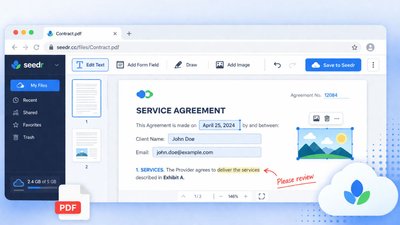
Edit a PDF online without Acrobat — what actually works

Edit a PDF online without Acrobat — what actually works

You need to fix a date on a signed lease. Add a signature to an offer letter. Highlight two clauses in a contract for your lawyer. The standard advice is "buy Acrobat" or "print, scribble, scan." Neither is great. What you actually want is a browser tab that lets you

How to open HEIC photos online on Windows, Android, or any browser

How to open HEIC photos online on Windows, Android, or any browser

Open HEIC photos online Someone AirDropped you a batch of iPhone photos. You drop them into Windows Explorer, double-click, and get a blank preview or a codec error. Android and Windows do not always handle HEIC cleanly, and the official fix — installing Apple's HEIF extensions, or buying a third-party

Connect Seedr to Infuse (iOS, tvOS, macOS)

Connect Seedr to Infuse (iOS, tvOS, macOS)

Infuse is the nicest media player on Apple hardware. Point it at your Seedr account over WebDAV or FTP and you get your whole Seedr library on Apple TV, iPhone, iPad, and Mac with posters, metadata, and fast scrubbing — no Plex server, no home PC. What this gets you

Three ways to add links and files in Seedr V2

Three ways to add links and files in Seedr V2

Seedr V2 rebuilds the add-to-cloud flow around one button and one paste. You can add a link, scan a webpage for downloads, upload a local file, or share straight from your phone — all without switching tabs. Why we changed the add-flow In V1, adding content meant picking the right

How to watch cloud videos offline with Seedr V2

How to watch cloud videos offline with Seedr V2

Watch cloud videos offline with Seedr V2 Offline Mode in Seedr V2 lets you save any file from your cloud to your device and watch it with no connection. One tap to mark a file offline. Switch to airplane mode. Press play. No buffering. This is a V2-only feature, Premium

How to open ZIP and RAR files online without installing anything

How to open ZIP and RAR files online without installing anything

Open ZIP and RAR files online, no install required Someone sent you a ZIP. Or you downloaded a RAR and the device you are on refuses to open it. Installing an extractor on a locked-down work laptop, a borrowed computer, or a phone is often more trouble than it is

Mount Seedr as a Drive (FTP, SFTP, WebDAV)

Mount Seedr as a Drive (FTP, SFTP, WebDAV)

Mounting turns Seedr into a normal folder on your machine. Your file manager, video player, or media server sees the files like they are on a local drive — no uploads, no downloads, just a remote filesystem. This works the same on Seedr V1 and V2. What this gets you

Use the Seedr Roku plugin — install and setup

Use the Seedr Roku plugin — install and setup

Roku is a closed-enough platform that getting a custom app on it takes more steps than a Fire TV or a Shield. The Seedr Roku plugin works by using Roku's Developer Mode to side-load the channel from your computer. Once it is in, it behaves like any other Roku channel

How to fetch only the files you actually need from a link

How to fetch only the files you actually need from a link

Download only what you need from a link You click a link for one episode and end up with the whole season, plus extras, plus a "sample" folder nobody asked for. That is how many download links behave by default — they point to a package, not a single file.

Making Seedr feel lighter: smoother playback and steadier fetches

Making Seedr feel lighter: smoother playback and steadier fetches

Seedr is now lighter under the hood We just shipped a batch of behind-the-scenes updates that make Seedr feel quicker during ordinary use. No new buttons. No setting to flip. Videos start faster, skipping feels smoother, and server-side fetches behave more predictably on long-running jobs. This post covers what changed,

The Seedr API is now easier to get

The Seedr API is now easier to get

The Seedr API is opening up The same API that runs our Sonarr, Radarr, Roku, and Kodi integrations is now available on request to any Premium or V2 user. No long form, no case-by-case review queue. Email support, we enable it, you build. Why we built this The Seedr API

How to view and organise images online, no software

How to view and organise images online, no software

View and organise your images online, without installing anything You want to look at a folder of photos without plugging in a cable, installing a photo app, or sending the files through a messaging app just to see them on another screen. Short answer: upload the images to Seedr, click

Downloading vs streaming in Seedr — when to use each

Downloading vs streaming in Seedr — when to use each

The old choice between "download the file" and "stream it" used to be a hard either-or. Seedr collapses both into one library: your files sit in the cloud, and you either press Play or press Save. This article is about when to use each, how to do both inside Seedr,

Pick your Seedr server manually in V2

Pick your Seedr server manually in V2

Pick the fastest route from Seedr to your device Seedr V2 now lets you benchmark active routes and choose a server yourself. Hit Check fastest , see which location wins right now, and pin it. No auto-switching mid-stream. You stay in charge of where your bits come from. Why we

Share to Seedr — add links without copy-paste (V2)

Share to Seedr — add links without copy-paste (V2)

Send links to Seedr with one tap Share to Seedr is live in V2. You can now send a link straight from the page you are on to your Seedr cloud. No copy-paste. No tab switching. It works on iOS, Android, and desktop. Install the Seedr PWA once, then use

Chromecast and AirPlay, rebuilt in Seedr V2

Chromecast and AirPlay, rebuilt in Seedr V2

Casting in Seedr V2, rebuilt from the engine up Seedr V2 ships a rewritten casting engine for Chromecast and Apple AirPlay. Faster starts, cleaner reconnects, subtitle and playlist picking, audio casting, and standard TV-remote control. Up to 4K on Master, network permitting. Works with Chromecast, Google TV, and AirPlay-capable screens.

Offline Play is coming to Seedr V2 (preview)

Offline Play is coming to Seedr V2 (preview)

Offline Play is coming to Seedr V2 Offline Play is a new Seedr V2 feature that lets you save a video to your device and watch it with no internet connection. It is rolling out gradually to Premium accounts. This post is a preview of what is landing, how to

How to create a ZIP archive online without installing software

How to create a ZIP archive online without installing software

Create a ZIP archive online You have a folder of files to bundle, hand off, or tidy up. Attaching ten things separately is ugly — email clients handle attachments differently, and recipients hate hunting through a chain. The fix is a ZIP archive: one file, in the order you chose.

Private-tracker support, upgraded in Seedr V2

Private-tracker support, upgraded in Seedr V2

Private-tracker support just got a serious upgrade Seedr V2 alpha now runs a rebuilt private-tracker engine with live status pings, a visible ratio counter, per-file selection on every job, and in-browser pause and resume. If you rely on private trackers, V2 is where you want to be. Why we rebuilt

Add subtitles to MP4 and MKV online — without re-encoding

Add subtitles to MP4 and MKV online — without re-encoding

You hit play on a film and there are no subtitles. Or the wrong language. Or they are baked into a separate SRT file that your TV cannot find. This guide covers the practical ways to add subtitles to a video file online — from attaching an SRT to a

Try the Seedr API Playground (Early Access!)

Try the Seedr API Playground (Early Access!)

Full read + write access to Seedr V2 is live

Full read + write access to Seedr V2 is live

Full read + write is now live in Seedr V2 Seedr V2 now supports full read and write access across FTP, SFTP, and WebDAV on premium plans. Rename in Finder, let Sonarr move files after import, run rsync into your NAS. One account, one library, two-way control. Why we built

How to open a RAR file without WinRAR

How to open a RAR file without WinRAR

Open a RAR file without WinRAR You received a RAR file. The official extractor is WinRAR — proprietary, Windows-first, and famous for the "please buy me" dialog that never actually stops you from using the software. You do not need it. There are free tools, cross-platform tools, and browser-based options

Connect Seedr to Jellyfin over WebDAV (step by step)

Connect Seedr to Jellyfin over WebDAV (step by step)

Jellyfin is the open-source answer to Plex: it scrapes your media, builds a library with posters and metadata, and streams to any device on your network. Point it at a Seedr mount and you have a private media server backed by cloud storage — no local NAS, no files sitting

How to convert Word to PDF online without Microsoft Office

How to convert Word to PDF online without Microsoft Office

Convert Word to PDF online, no Office required You finished the document in Word. The person on the other end wants a PDF. You are on a phone, a borrowed laptop, or a locked-down work machine where installing Office is not happening. The answer is converting Word to PDF online,

Install Seedr as an app with the new PWA

Install Seedr as an app with the new PWA

Seedr now installs like an app The Seedr Progressive Web App lets you install Seedr directly on your desktop or mobile device. Home-screen icon, full-screen UI, faster launch, no app store required. Same account, same files, same cloud — but it feels like a native app instead of a browser

How to convert DOCX to PDF online without installing anything

How to convert DOCX to PDF online without installing anything

Convert DOCX to PDF online, in one step You finished a document in Word or Google Docs. The other side wants a PDF. The machine in front of you does not have Office, or you are on a phone, or the IT policy forbids installing software. Converting DOCX to PDF

How to scan a web page for download links automatically

How to scan a web page for download links automatically

Scan a page for links in one step You open a page to grab a single file and instead you find ten "Download" buttons, two pop-up tabs, and a countdown timer. The real link is buried somewhere on the page. Scanning a page for links means pointing a tool at

Convert Word to PDF online (redirect)

Convert Word to PDF online (redirect)

This guide has moved The full walkthrough for converting Word (DOC or DOCX) to PDF online lives at [/word-to-pdf-online](/word-to-pdf-online) . That page covers: • When you actually need PDF over Word. • How to convert a Word file to PDF in Seedr in three clicks. • Formatting, fonts, and page-break

Connect Seedr to Plex via FTP (Pro plan guide)

Connect Seedr to Plex via FTP (Pro plan guide)

FTP is the path for Plex + Seedr if you are on the Pro plan (or the new Basic). It is simple, stable on long sessions, and every major OS can mount it. If you have Master, look at the WebDAV guide instead — WebDAV is the canonical Plex +

Connect Seedr and Plex with WebDAV (Full Guide)

Connect Seedr and Plex with WebDAV (Full Guide)

This is the deep-dive: Plex Media Server reading your media from a Seedr WebDAV mount. WebDAV is the most stable Plex + Seedr combo — mount it once, Plex treats Seedr as a local drive, your whole library streams on demand without anything saved to your disk. If you are

Plex for Beginners: Install, Libraries, and Seedr

Plex for Beginners: Install, Libraries, and Seedr

Plex is a media server. You install it on a computer, point it at folders full of movies or TV, and it fetches posters and metadata so you can watch on any device — phone, TV, laptop, console — with your own library. This guide walks a complete beginner through

Playback speed control in Seedr V2

Playback speed control in Seedr V2

Seedr V2's browser player now supports playback speeds from 0.5x to 3x. Slow a tutorial down to catch a step. Skim a lecture at 1.5x. Switch speeds mid-video without reloading. Why we built this Fixed-speed playback is a hassle in three situations people hit often: • Tutorials and lectures —

Seedr upgrades: speed control, new downloader, mobile improvements

Seedr upgrades: speed control, new downloader, mobile improvements

A batch of Seedr updates you should notice Several improvements are now live across Seedr. Playback speed control in V2. A rewritten downloader that fixes stuck saves. A mobile browser experience that drains less battery. A new search and filtering system is next up. Here is what changed, why, and

Seedr V2 audio player — play music from your cloud

Seedr V2 audio player — play music from your cloud

Seedr V2 has a built-in audio player. Open an MP3 or FLAC from your cloud and it plays in the browser — no app install, no format conversion, no device syncing. Why we built it Most people's music lives in two places: a streaming service subscription and a pile of

Multi-language subtitles in Seedr: add, switch, search in-player

Multi-language subtitles in Seedr: add, switch, search in-player

Subtitles in any language, inside the Seedr player Seedr now supports multi-language subtitles with a built-in OpenSubtitles search. You can add, switch, or upload subtitle tracks directly in the video player. No separate app. No restart of the video. No hunting for .srt files in sketchy corners of the internet.

Introducing Dark Mode

Introducing Dark Mode

Originally posted March 10, 2024 We’re excited to announce that Seedr now offers a dark mode option! This highly requested feature allows users to switch to a darker color scheme, making it easier on the eyes in low light conditions. With dark mode enabled, the background of the Seedr interface...

Annual Seedr plans: two months free, plus new pay options

Annual Seedr plans: two months free, plus new pay options

Two months free on annual Seedr plans If you pay for Seedr a year at a time, you get two months free — a straightforward 12-for-10 deal compared to paying monthly. Checkout now supports Apple Pay and Google Pay alongside credit card and Bitcoin. Same plan, same features. Lower total

The new Tasks page in Seedr V2

The new Tasks page in Seedr V2

Seedr V2 has a dedicated Tasks tab. Every active and recent download sits in one list with progress, speed, ETA, and pause/resume controls. It replaces the scattered V1 layout where transfers lived in two or three different panels. Why we built it In V1, tracking downloads was harder than it

V2 time-savers — what Seedr does so you don't wait

V2 time-savers — what Seedr does so you don't wait

The shortest version: paste a link, Seedr's servers download it, and the file shows up in your cloud. You don't wait at a progress bar, you don't babysit a transfer, and you don't need to be on the same device you started from. This is a roundup of the V2

Seedr Media Player Tips and Keyboard Shortcuts

Seedr Media Player Tips and Keyboard Shortcuts

The short version Seedr's media player runs in the browser. It plays your cloud files without any install, on any platform — Mac, Windows, Linux, Android, iOS — because it's the browser doing the work. These tips speed up day-to-day use: keyboard shortcuts, subtitle tricks, playback speed, and window modes.

Seedr Media Player Features: The Reference

Seedr Media Player Features: The Reference

The short version Seedr has a media player built into the browser. It plays video and audio stored in your account without needing VLC, an app install, or a file download. This is the feature reference — what it supports, what it does not, and what is coming. For keyboard

Download Delays: How They Can Hinder Us

Download Delays: How They Can Hinder Us

What to Do While Seedr Is Saving Your Files

What to Do While Seedr Is Saving Your Files

The one-sentence answer Close the tab and go do something else. Seedr saves to the cloud, not to your device, so your machine doesn't need to be on. When you come back, the files are waiting in your account. Why this is different from a regular download A regular download

Seedr V2 — a first look at the new UI

Seedr V2 — a first look at the new UI

Seedr V2 is a full UI rebuild. Lighter layout, separate tabs for different jobs, grid or list views, and better filters. This is a tour of what changed and where to find each feature. Why we rebuilt the UI V1 grew feature by feature. Every new capability added another button

 Regarding Our Recent Downtime

Regarding Our Recent Downtime

Install and Use the Seedr Firefox Add-on

Install and Use the Seedr Firefox Add-on

The Seedr Firefox add-on turns any file link or direct download URL into a right-click → Send to Seedr away from hitting your disk. No local download app, no open tabs on a sketchy site, no waiting for the file to finish on your home connection. What this gets you

Connect Seedr over FTP with FileZilla (step by step)

Connect Seedr over FTP with FileZilla (step by step)

FTP is still the simplest way to treat your Seedr cloud like a remote hard drive: drag files in, drag files out, queue up a directory, leave it running overnight. Seedr exposes a full FTPS endpoint to Pro and Master subscribers. This guide uses FileZilla because it is free, cross-platform,

Integrate Seedr with Kodi (WebDAV, FTP, add-on)

Integrate Seedr with Kodi (WebDAV, FTP, add-on)

Kodi is the open-source media center that runs on just about anything — Windows, Linux, macOS, Fire TV, Android TV, a Raspberry Pi. If your movies live in Seedr, you have three ways to bring them into Kodi: mount via WebDAV, mount via FTP, or install the official Seedr add-on

View and stream files in Seedr without installing anything

View and stream files in Seedr without installing anything

Seedr has a built-in viewer for the files you already keep in your cloud. Click a file in your library and it opens in the browser. Video plays. PDF renders. HEIC photos show as normal images. No local copy, no VLC, no Acrobat, no "open with" prompts. This guide covers

How to use subtitles in Seedr with OpenSubtitles

How to use subtitles in Seedr with OpenSubtitles

<!-- Note: slug contains a space; will be migrated to kebab-case ( using-subtitles ) server-side. --> Use subtitles in Seedr — OpenSubtitles, SRT upload, and sync Subtitles in Seedr work two ways: search and load from OpenSubtitles directly inside the player, or upload an SRT file you already have. Both

How to Upgrade Your Seedr Account

How to Upgrade Your Seedr Account

What this tutorial covers You'll learn how to move from the free plan to a paid Seedr plan. By the end you'll know how to pick the right tier, pay, confirm the upgrade applied, and start using the extra storage, concurrent save slots, and FTP/SFTP/WebDAV access. Upgrades usually apply instantly.

How to: Invite friends and get more space

How to: Invite friends and get more space

How to Organize Your Files in Seedr

How to Organize Your Files in Seedr

What this tutorial covers You will learn the practical tools for keeping your Seedr account tidy: making folders, moving files around, renaming, searching, and bulk actions like multi-select delete. By the end, "where is that file?" should stop being a recurring question. Prerequisites • A Seedr account with at least

Seedr Chrome extension — install, set up and use

Seedr Chrome extension — install, set up and use

The Seedr Chrome extension turns any file link you find in a browser into a one-click add to your cloud. Right-click a link, pick Add to Seedr , and the file starts saving to your account. No copy-pasting URLs, no separate tab. It works in Chrome, but also in every

 How To: Transfer files into your Seedr

How To: Transfer files into your Seedr

How to Use Seedr: A Beginner's Tutorial

How to Use Seedr: A Beginner's Tutorial

What this tutorial covers This is the first-ten-minutes tour of Seedr. You will create an account, add your first link, watch the file land in your cloud, play it in the browser viewer, and save a copy to your device. By the end, you will know the core loop —

Stay Up To Date


Subscribe for our blog latest updates, promotions and more.